
Setting up PPP
This paper provides helpful information about how to get started with Ethernut's PPP.
PPP, the Point to Point Protocol can be used to encapsulate IP and other packets on a serial link. As its name implies, the link is established between two points only. The initiator is called the PPP client, which connects to the PPP server on the other end of the line. The current Ethernut implementation supports the client mode only. Thus, Ethernut can actively call another party, but is not able to answer incoming calls. However, as soon as a PPP session has been established, either party may run TCP or UDP servers or clients.
PPP is a complex protocol with many parameters. Unlike Ethernet connections, several steps are required to establish a session. This paper is intended for experienced C programmers with some basic knowledge of the Nut/OS API.
Hardware
Like most PPP implementations, Ethernut uses a UART as the physical interface. This allows to establish a local IP connection using a simple RS-232 cable between Ethernut and another computer, e.g. a PC running Linux or another operating system. As explained above, a PPP server must be up and running on the remote computer.
Beside local network connections, it is also possible to use PPP to connect to the Internet. To do this, you'll need a dial-up ISP (Internet Service Provider) and a modem to connect to this provider. There are many different kind of modems available, which can be attached to the Ethernut board's RS-232 connector. Older analog models use standard telephone lines. Today almost any telephone company offers direct Internet access via digital lines, to be attached to your local Ethernet network. Thus, analog modems had become less common.
Modems using mobile telephone systems are quite attractive though. They allow mobile Internet access at places, where Ethernet is not or not yet available. Many mobile phones provide an internal modem. Unfortunately, only a few older models offer an RS-232 interface to be connected to our Ethernut board. As an alternative you can purchase an external wireless modem. Some of them come with a case and a standard RS-232 connector, while other are offered as bare modules for PCB mounting. Typically, the modules provide do not provide the standard -12V...+12V RS-232 levels at the UART interface, but 5 or 3.3V TTL-level. They may be directly connected to the Ethernut expansion port. In any case you must consult the modem's datasheet to make sure it will be compatible with the voltage level used at the expansion port, 5V on Ethernut 1 and 2 and 3.3V on Ethernut 3 and 5.
Apart from the compulsory receive and transmit lines, you'll also need hardware handshake lines, at least one incoming and one outgoing line. On Ethernut 1 and 2 the incoming line is named CTS. The modem uses this line to signal Ethernut, that it is ready to receive data. For the Nut/OS' interrupt driven UART driver it is essential, that this line is connected to an external interrupt pin. The low interrupt latency of Nut/OS allows the driver to receive data at 115200 Baud without handshake. Thus, the outgoing handshake line can be used to signal the modem when to terminate the connection (hanging up the phone). Often this could be done by software as well, but hardware handshake is the preferred method, because it is more reliable. Terminating an established connection is essential, specifically if the ISP charges connection times.
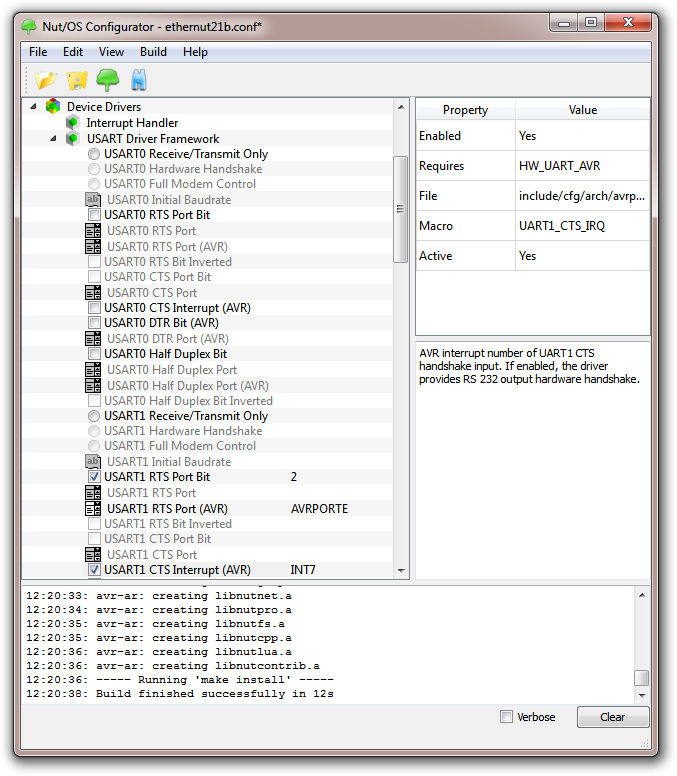
Hardware handshake is not enabled by default, but must be explicitly set in the Nut/OS Configurator. The screenshot shows the configuration for Ethernut 2, using UART1 for the modem connection. The following pictures shows the related jumper configuration for JP1, top and side view.

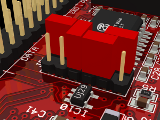
This jumper setting should be used to attach a modem with an RS-232 compatible interface to the DB-9 connector of the Ethernut board. In most cases you'd need a Null-Modem cable with a male plug on each side, but it depends on the RS-232 connector of the modem.
When using a modem module with TTL (5V) compatible UART interface, it would make more sense to leave JP1 in its standard configuration and attach the modem directly to the expansion port pins.
We could have used UART0 as our modem interface, but typically this device is used by almost any Nut/OS application for standard output. When testing PPP, it is most useful to be able to trace the connection status by printing some information to the DEV_DEBUG device attached to stdout, using a terminal emulator on our PC to view and log the output. If the modem is attached to the RS-232 connector, we already used up all four RS-232 level shifters provided by IC6. In order to attach the PC serial port, we'd need at least one more transmitter connected to port pin PE1 (UART0 transmit). This is not too difficult to build.
If your Ethernut is still ATmega103 based, you got a real problem here, because this chip has a single UART only. You need to attach an external UART chip and rewrite the debug device driver or replace the ATmega103 with an ATmega128. It is clear, that this will be a project of its own.
Device Initialization
First of all the serial interface has to be initialized. On Nut/OS a UART driver is used and must be registered. PPP uses HDLC for the data link layer. A special UART device driver with embedded HDLC protocol handling is available for this. Register devAhdlc0 for the first and devAhdlc1 for the second UART.
NutRegisterDevice(&devAhdlc1, 0, 0);
At the time of this writing devUsartAvr is the most advanced UART driver for the AVR platform. However, PPP runs best, when the HDLC part is integrated into the driver. Unfortunately, devAhdlc is based on the old devUart driver and may not provide all function which are available with devUsartAvr. Beforre using special ioctl() functions, take a look into the source code to make sure that they are implemented.
The Nut/OS PPP driver is also implemented as a device. Thus, the application has to register it as well.
NutRegisterDevice(&devPpp, 0, 0);
Now, as the PPP device is registered, we can open it. The name of the device is ppp. Note the lower case letters. Similar to most other operating systems, devices are opened in Nut/OS, by their names. In addition, Nut/OS allows to add a colon to the device name, followed by a path. This is similar to DOS and Windows, when specifying a path of a file or directory on a certain device or drive. However, we do not really specify a path, but pass several parameters, separated by slashes. Make sure to use slashes as used under Linux, not backslashes as used under Windows.
pppcom = _open("ppp:uart1/user/passwd", _O_RDWR | _O_BINARY);
The first parameter is the name of the UART device, which PPP should use. We
registered devAhdlc1 for this purpose, the name of this device is uart1.
Actually, all devices using the second AVR UART do have the same symbolic
name uart1. This makes sure, that only one driver gets
attached to this hardware interface. If there is a new driver at any later
time, you only need to change the call to NutRegisterDevice().
PPP is usually used for dialing into remote hosts over a public telephone network. When using analog telephone lines, some login information will be required. Thus, the remaining part consist of a user's name, followed by the corresponding password. If your provider doesn't require authentication, you can simply leave them out.
Do not mix up this PPP authentication with ordinary user login, which sometimes may be required in addition. User logins can be handled by NutChat() before PPP is actually activated. We will soon discuss the NutChat() in detail. PPP authentication on the other hand is part of the negotiation between the PPP client (Ethernut) and the PPP server (ISP). This negotiation will later run automatically in the background and is out of our control. Thus we need to provide this information before the negotiation actually starts.
Digital phone lines, specifically wireless networks provide other methods for authentication. In this case ISPs often publish a default or simply accept any user/password pair.
If the open call for the PPP device succeeds, it returns a handle for this device, which can be used to set the baudrate. For this kind of special device functions, Nut/OS offers the ioctl() routine.
uint32_t lctl = 38400;
_ioctl(pppcom, UART_SETSPEED, &lctl);
Up to this point, nothing has been transmitted. Both, the UART and the PPP device just sit there, waiting for data to be transmitted or received.
Dialing Out
As expalined above, PPP can be used with different kind of serial hardware. The most simple one is a serial cable. However, most applications will use a modem connected to an analog telephone line or a wireless modem. Let's look to the analog modem first.
Here we used the US Robotics Courier Dual Standard V34+, an ancient part, but still useful. You can use almost any brand, preferable one with Hayes compatible command set.
After initialization, our PPP interface is still inactive. The HDLC mode of the UART driver is still disabled and the interface can be used in a normal fashion, sending and receiving single characters. This way we can talk to the modem, sending Hayes commands and receiving responses. You could use standard functions like fprintf() or fscanf() for the conversation. If different modems should be supported by your application, the required coding may become bothersome.
Fortunately Nut/OS offers the NutChat() routine, which executes a simple chat script and returns its result. In general, chat scripts are made of one or more pairs of strings. The first part of such a pair is the string, that is expected and the second part is the one to be sent. A simple chat script looks like this
"'' AT OK ATD555 CONNECT"
It consists of two and a half pair. The first pair is an empty string '' followed by the string AT. When executed, NutChat() expects nothing and sends out AT followed by a carriage return. The carriage return need not to be specified in the script, it is automatically appended to the output string. If the modem understands the Hayes command set, it will respond to the AT command with a simple OK, followed by a carriage return. This is where the second pair jumps in. It expects the string OK and, as soon as this is received, responds with ATD555, which is the Hayes command to dial 555. The last pair is not complete. It just specifies the expected string, but doesn't define the response. Thus the response is assumed to be empty. As soon as the modem establishes a connection, it sends sends out something like
CONNECT 38400/ARQ
As soon as NutChat() detects the string CONNECT, it will return with result zero. The application is now informed, that the modem connection has been successfully established.
int ProtocolPortConnect(int pppcom, char *script)
{
    int rc;

    printf("Connecting...");
    for (;;) {
        rc = NutChat(pppcom, script);
        switch (rc) {
        case 0:
            puts("done");
            /* A short pause is required here to let the driver
               initialize the receiver thread. */
            NutSleep(100);
            break;
        case 1:
            puts("bad script");
            break;
        case 2:
            puts("I/O error");
            break;
        case 3:
            puts("no response");
            break;
        default:
            printf("aborted with result %d\n", rc);
            break;
        }
        if (rc < 3) {
            break;
        }
        NutSleep(10000);
    }
    return rc;
}
The function contains a loop, which will endlessly try to establish a connection every ten seconds unless a severe error is detected. A related call might be
ProtocolPortConnect(pppcom, "'' AT OK ATD555 CONNECT");
It is not unusual, that the modem will respond with a different string, like BUSY if it detects, that the dialed number is occupied. NutChat() offers a variety of functions to handle such situations. Here is a more advanced example
"TIMEOUT 10 ABORT BUSY ABORT 'NO CARRIER' '' ATZ OK ATDT555 CONNECT"
The first pair starts with the special keyword TIMEOUT. NutChat() will not take this as a normal pair of strings, but interprets it as an internal command. TIMEOUT 10 will set the timeout to 10 seconds. A timeout pair may be specified multiple times in order to change its value while the script is executed. If any of the expected strings doesn't appear within the specified number of seconds, then NutChat() will return an error value of 3. ABORT is another special keyword. Whenever the string, which follows the ABORT keyword, is send by the modem, NutChat() will abort the script processing and return an error value to the caller. The value returned is 4 plus the index of the specified abort string. In our given example, BUSY will return 4, 'NO CARRIER' will return 5. This way the application is able to determine, what causes the failure.
You may have noted the hyphens with 'NO CARRIER'. These are required to make this a single string within the script.
Finally the keyword REPORT may be used to store the last modem response in a buffer, which can be accessed through the global u_char pointer chat_report after NutChat() returned. This is quite useful to check the complete connection string returned by the modem.
Modems are picky devices and NutChat() allows to use special characters to further control them.
\b  Backspace character
\c  Suppresses carriage return at the end of a send string
\d  Delay 1 second
\n  Line feed character
\N  Null character
\p  Delay 100 milliseconds
\r  Carriage return character
\s  Space character
\t  Tab character
\\  Backslash character
\DDD Character DDD, where DDD are up to three octal digits
When using these characters be aware, that the compiler will translate backslashes within string literals. Using \r will be replaced by a carriage return, which is not what we want. In order to add a backslash plus character 'r', we must write \\r within string literals. Using these characters, the "ABORT 'NO CARRIER'" may also have been written as "ABORT NO\\sCARRIER", which saves us one character. You do not agree? Then remember, that the compiler replaces the backslashed backslash with a single backslash.
It's likely, that you need to consult your modem's manual to find out more. It is also a good idea to try the modem commands with your PC and a terminal emulator first.
Using the mobile telephone network doesn't differ much from using standard telephone lines and modems. In fact, the GPRS and UMTS devices, that are, for example, build into modern mobile phones, act like Hayes compatible modems. Even better, their command set is much more standardized. Here's a simple chat script for the German provider t-mobile:
"'' AT OK AT+CGDCONT=1,\"IP\",\"internet.t-mobile\" OK ATD*99***1# CONNECT"
Network Interface Setup
 As soon as the modem connection is active, the application needs
to configure the PPP network device by calling NutNetIfConfig().
Note, that the two last parameters, which usually specify the IP address
and the network mask are usually set to zero. In most cases the PPP server
on the remote side will provide these settings. The second function argument
is used with Ethernet devices to point to a buffer containing the MAC address.
For PPP we pass a NULL pointer instead.
As soon as the modem connection is active, the application needs
to configure the PPP network device by calling NutNetIfConfig().
Note, that the two last parameters, which usually specify the IP address
and the network mask are usually set to zero. In most cases the PPP server
on the remote side will provide these settings. The second function argument
is used with Ethernet devices to point to a buffer containing the MAC address.
For PPP we pass a NULL pointer instead.
rc = NutNetIfConfig("ppp", NULL, 0, 0);
This simple call does it all, but under the hood, this is the most complicated part. In any case, check its return value. If anything goes wrong, this is the place to check and we will look into it in more detail now.
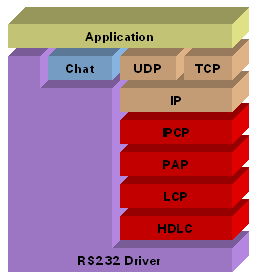
PPP adds four layers to the Ethernut TCP/IP stack.
HDLC  PPP in HDLC-like Framing (RFC 1662)
LCP   PPP LCP Extensions (RFC 1570)
PAP   PPP Authentication Protocols (RFC 1334)
IPCP  Internet Protocol Control Protocol (RFC 1332)
As stated above, the PPP interface is still inactive after its initialization and even after the PPP device has been opened. However, opening the PPP device initializes the states of all PPP layers. Opening the PPP device puts both, the IPCP and the LCP layer in the STARTING mode. In this mode, the layers will neither accept any input nor generate any output.
When the application calls NutNetIfConfig(), the RS232 interface will be switched to HDLC mode. When this happens, all transmitted data is packed into HDLC frames and all received data is expected to be packed in HDLC frames. In addition, the HDLC layer will report to the LCP layer, that it is up and running.
As soon as the LCP layer is informed, that the lower layer is up, it will send out a request through the HDLC layer. Assuming, that the modem is still connected, this request will be packed into a HDLC frame and send via modem to the remote. The remote's stack works in the same way and consequently sends out an LCP request. In simple words, more or less at the same time both sides will receive an LCP request.
The HDLC layer passes incoming LCP telegrams to the LCP layer by calling NutLcpInput(). The LCP request telegram contains a list of options, which the other side prefers to use during the upcoming session. Valid options are the maximum number of bytes in a single telegram or the type of authentication. Each side will now make up its mind about this request and either accept, not accept or reject the requested options. The difference between not accepting an option and rejecting it is as follows: A rejected option is not negotiable, which means, that the responding side simply doesn't provide it. An option is not accepted, if the other side is generally able to provide this function, but not in the requested way. As an example, a node may provide authentication, but not the type of authentication requested by the remote. The server may request CHAP authentication, but the client is only able to provide PAP authentication.
If a requested option is declined, the requester will decide, whether it makes sense to further continue. Thus, the requester may not allow any other authentication than CHAP. If the remote doesn't accept this, it will send an LCP termination request to shut down the conversation. As long as unacknowledged options are negotiable, both sides continue to send requests and responses.
When finally all options had been accepted by both sides, LCP will send a LOWER UP report to the IPCP layer, or, if any authentication has been negotiated, initiate the authentication protocol.
At the time of this writing, Ethernut supports PAP only. The bad thing about PAP is, that passwords are not encrypted when passed to the remote. Although telephone lines are considered safe and digital networks offer other ways to authenticate the caller, some hosts may not accept authentication without encryption. Some time ago Michel Hendricks contributed CHAP authentication routines, which are available in the download archive. Look for a file named michelChap.zip. The current problems are, that this was based on an early version of Nut/OS and contains a few more changes (fixes?) than just adding CHAP. Furthermore it uses the RCA version of MD5, which had been published under a different license. Alternatively you may use the MD5 code that is available in nut/gorp/md5.c. The API is quite similar.
If authentication fails due to wrong passwords or illegal user names, the authentication layer will inform the IPCP layer, that the lower layer is down. Now, step by step, all layers will go down and finally disable the HDLC mode in the UART driver.
If authentication succeeds, the IPCP layer will be informed, that its lower layer is up and IPCP starts negotiating in a similar way as LCP did before. Of course, IPCP negotiates different options, mainly IP addresses. If the application called NutNetIfConfig() with IP address set to zero, Ethernut will accept any local IP address for its PPP network interface.
Later versions of Nut/OS come with a sample application, which connects to an ISP (t-mobile, Germany) , queries the IP address of www.pool.ntp.org and requests the current date and time from this IP address. Here is a sample output:
PPP Client Sample - Nut/OS 4.9.10.0
Open PPP interface at uart1...115200 baud, 1000 ms timeout
Connecting...done
Configure network interface...done
     Local IP: 10.152.40.86
    Remote IP: 192.168.254.254
  Primary DNS: 193.254.160.1
Secondary DNS: 10.74.83.22
Is There Anybody Out There? Yes, found 131.234.137.23
What's the time? Sun, 17 Apr 2011 15:38:12 GMT
I'll be back in 1 hour.
Hanging Up
Terminating a session is not as easy as it might look first. The host, that wants to terminate a session sends an LCP TERM request, will wait a few seconds for an LCP TERM acknowledge and then shut down all layers. If the host receives an LCP TERM request, it responds with a LCP TERM acknowledge and shuts down all layers.
The problem that remains is the modem connection. The modems are not PPP aware. They simply transport any kind of binary data from one end to the other. Assuming that the other side hangs up reliable, we may not bother about the modem on our side. If the other side hangs up, our modem will recognize this and hang up too. So far, so good. If something goes wrong, we may end up with an established connection for hours, days or more. If the telephone company charges connection times, this may become really expensive.
One solution would be to use the idle timeout, which most analog modems support. If no traffic is generated within a specified time, the modem will automatically hang up. As you can imagine, this method is not really reliable and additionally causes the connection to stay alive longer than necessary.
Most Hayes compatible modems offer escape sequence detection. If they receive three consecutive + characters, they will change back to command mode. So we can send the ATH command to hang up. Again, this is unreliable too. Practice shows, that the detection of +++ rarely works as expected.
The solution is, as explained earlier in the hardware chapter, using a hardware handshake line. Usually DTR is used for this purpose. The Ethernut 1 and 2 boards do not provide DTR, but RTS. Either the modem can be configured to drop the connection on RTS or we need a special adapter cable to route the RTS output on the Ethernut board to the DTR input of the modem.
Troubleshooting
As we learned, setting up a PPP connection is a complex task. If it does not work, the same rule applies as with any other complex problem:
Break it down!
Forget your application and create simple stand-alone procedures. For the first step you don't even need Ethernut. Connect your modem to the PC's serial port and use a terminal emulator to manually test your chat script. Do not proceed until you are able to get a CONNECT response from your modem.
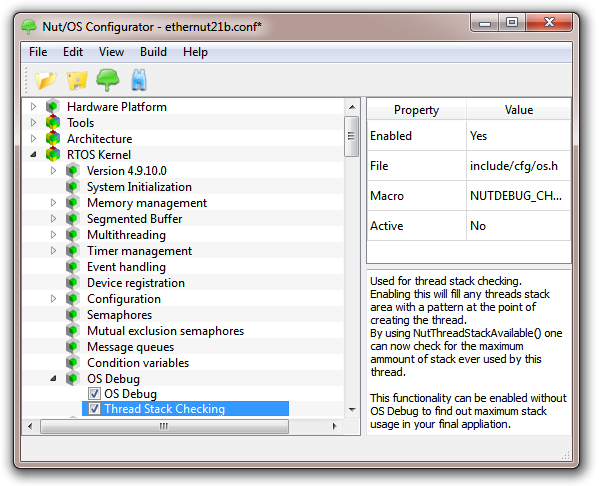
As stated above, most problems arise during NutNetIfConfig(), when the PPP session is established. Nut/OS offers some debug capabilities to track down these problems. To save code and data space, debugging is not included by default. In the Nut/OS Configurator check OS Debug. With some Nut/OS versions this may result in an error when trying to link the application. In that case additionally check Thread Stack Checking.
The configuration change requires to rebuild the Nut/OS libraries with debug code included. It is also always a good idea to re-create your sample directory. Don't worry, this will not touch any existing source code files, but will make sure, that your application tree and the build tree configuration stay synchronized.
Nut/OS debug output goes to a stdio stream, typically standard output, assigned to an UART. As we already used one UART to connect the modem, we need a second UART interface. How to set this up had been explained earlier in the hardware chapter.
While general debugging is now available, the application must explicitly enable PPP tracing, which is best done right after stdout has been assigned to the DEV_DEBUG device, e.g.
uint32_t baud = 115200;

/* Register debug UART. */
NutRegisterDevice(&DEV_DEBUG, 0, 0);
/* Open debug device for standard output. */
freopen(DEV_DEBUG_NAME, "w", stdout);
/* Set baud rate. */
_ioctl(_fileno(stdout), UART_SETSPEED, &baud);
/* Print banner. */
puts("PPP Debugging");

/* Enable PPP tracing. */
NutTracePPP(stdout, 1);
As soon as NutNetIfConfig() is called, you should see some output on the terminal emulator. First comes LCP handshaking:
PPP Debugging
[LCP-LOWERUP]
PPP<(20)[LCP-001(16)][CONFREQ][OPT(12)][ACCM=0x000A0000][MAGIC=0x7C563412]
PPP>(29)[LCP-003(25)][CONFREQ][OPT(21)][ACCM=0x000A0000][PCOMP][ACOMP][MAGIC=0x11F17B71][AUTH=0xC223]
PPP<(12)[LCP-003(8)][CONFNAK][OPT(4)][AUTH=0xC023]
PPP>(20)[LCP-001(16)][CONFACK][OPT(12)][ACCM=0x000A0000][MAGIC=0x7C563412]
PPP>(28)[LCP-005(24)][CONFREQ][OPT(20)][ACCM=0x000A0000][PCOMP][ACOMP][MAGIC=0x11F17B71][AUTH=0xC023]
PPP<(28)[LCP-005(24)][CONFACK][OPT(20)][ACCM=0x000A0000][PCOMP][ACOMP][MAGIC=0x11F17B71][AUTH=0xC023]
The following step is taken after both parties agree on PAP authentication.
PPP<(18)[PAP-003(14)][CONFREQ][OPT(10)][me][secret]
PPP>(9)[PAP-003(5)][CONFACK]
Finally the IP addresses are provided during IPCP handshake.
[IPCP-LOWERUP]
PPP<(26)[IPCP-004(22)][CONFREQ][OPT(18)][ADDR=0.0.0.0][DNS1=0.0.0.0][DNS2=0.0.0.0]
PPP>(14)[IPCP-001(10)][CONFREQ][OPT(6)][ADDR=192.168.254.254]
PPP<(14)[IPCP-001(10)][CONFACK][OPT(6)][ADDR=192.168.254.254]
PPP<(26)[IPCP-004(22)][CONFREQ][OPT(18)][ADDR=0.0.0.0][DNS1=0.0.0.0][DNS2=0.0.0.0]
PPP>(26)[IPCP-004(22)][CONFNAK][OPT(18)][ADDR=10.148.172.39][DNS1=10.74.83.22][DNS2=193.254.160.1]
PPP<(26)[IPCP-005(22)][CONFREQ][OPT(18)][ADDR=10.148.172.39][DNS1=10.74.83.22][DNS2=193.254.160.1]
PPP>(26)[IPCP-005(22)][CONFACK][OPT(18)][ADDR=10.148.172.39][DNS1=10.74.83.22][DNS2=193.254.160.1]
Not much information is exchanged when closing the connection.
[LCP-LOWERDOWN]
[IPCP-LOWERDOWN]
[IPCP-CLOSE]
The following RFCs will help to analyze the output, specifically RFC1570 (LCP), RFC1334 (PAP) and RFC1332 (IPCP). If you think you discovered a bug or if you added a new feature or if you just want to clarify things, then you are welcome contact the developers via the Ethernut mailing list.
Related RFCs
RFC 1332
The PPP Internet Protocol Control Protocol (IPCP)
RFC 1334
PPP Authentication Protocols (PAP, obsoleted by RFC1994)
RFC 1377
The PPP OSI Network Layer Control Protocol (OSINLCP)
RFC 1378
The PPP AppleTalk Control Protocol (ATCP)
RFC 1471
The Definitions of Managed Objects for the Link Control Protocol of the
Point-to-Point Protocol
RFC 1472
The Definitions of Managed Objects for the Security Protocols of the
Point-to-Point Protocol
RFC 1473
The Definitions of Managed Objects for the IP Network Control Protocol of the
Point-to-Point Protocol
RFC 1474
The Definitions of Managed Objects for the Bridge Network Control Protocol of
the Point-to-Point Protocol
RFC 1547
Requirements for an Internet Standard Point-to-Point Protocol
RFC 1552
The PPP Internetwork Packet Exchange Control Protocol (IPXCP)
RFC 1553
Compressing IPX Headers Over WAN Media (CIPX)
RFC 1570
PPP LCP Extensions
RFC 1598
PPP in X.25
RFC 1618
PPP over ISDN
RFC 1661
The Point-to-Point Protocol (PPP)
RFC 1662
PPP in HDLC-like Framing
RFC 1663
PPP Reliable Transmission
RFC 1762
The PPP DECnet Phase IV Control Protocol (DNCP)
RFC 1763
The PPP Banyan Vines Control Protocol (BVCP)
RFC 1764
The PPP XNS IDP Control Protocol (XNSCP)
RFC 1962
The PPP Compression Control Protocol (CCP)
RFC 1963
PPP Serial Data Transport Protocol (SDTP)
RFC 1967
PPP LZS-DCP Compression Protocol (LZS-DCP)
RFC 1968
The PPP Encryption Control Protocol (ECP)
RFC 1973
PPP in Frame Relay
RFC 1974
PPP Stac LZS Compression Protocol
RFC 1975
PPP Magnalink Variable Resource Compression
RFC 1976
PPP for Data Compression in Data Circuit-Terminating Equipment (DCE)
RFC 1977
PPP BSD Compression Protocol
RFC 1978
PPP Predictor Compression Protocol
RFC 1979
PPP Deflate Protocol
RFC 1989
PPP Link Quality Monitoring
RFC 1990
The PPP Multilink Protocol (MP)
RFC 1993
PPP Gandalf FZA Compression Protocol
RFC 1994
PPP Challenge Handshake Authentication Protocol (CHAP)
RFC 2043
The PPP SNA Control Protocol (SNACP)
RFC 2097
The PPP NetBIOS Frames Control Protocol (NBFCP)
RFC 2118
Microsoft Point-To-Point Compression (MPPC) Protocol
RFC 2125
The PPP Bandwidth Allocation Protocol (BAP) The PPP Bandwidth Allocation
Control Protocol (BACP)
RFC 2153
PPP Vendor Extensions
RFC 2284
PPP Extensible Authentication Protocol (EAP)
RFC 2363
PPP Over FUNI
RFC 2364
PPP over AAL5
RFC 2419
The PPP DES Encryption Protocol, Version 2 (DESE-bis)
RFC 2420
The PPP Triple-DES Encryption Protocol (3DESE)
RFC 2433
Microsoft PPP CHAP Extensions
RFC 2484
PPP LCP Internationalization Configuration Option
RFC 2615
PPP over SONET/SDH
RFC 2661
Layer Two Tunneling Protocol 'L2TP'
RFC 2701
Multi-link Multi-node PPP
RFC 2716
PPP EAP TLS Authentication Protocol
RFC 2759
Microsoft PPP CHAP Extensions, Version 2
RFC 2823
PPP over Simple Data Link (SDL) using SONET/SDH with ATM-like framing
RFC 3078
Microsoft Point-To-Point Encryption (MPPE) Protocol
RFC 3153
PPP Multiplexed
RFC 3255
Extending PPP over SONET/SDH, with virtual concatenation, high order and low
order payloads
RFC 3336
PPP over Asynchronous Transfer Mode Adaptation Layer 2
RFC 3518
Point-to-Point Protocol (PPP) Bridging Control Protocol (BCP)